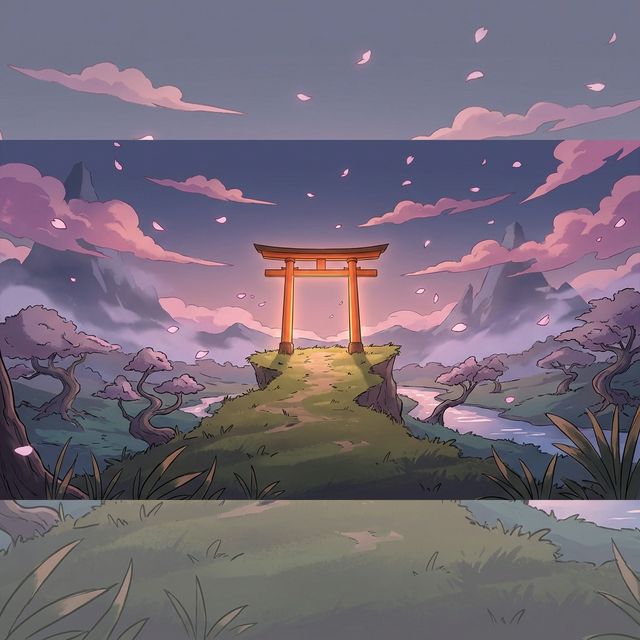
If you've spent any time searching for live wallpapers on Android, you already know: the anime and manga category is in a league of its own. From Shonen action scenes frozen mid-strike to Studio Ghibli-style landscapes gently breathing with life — animated anime wallpapers are the most requested, most shared, and most visually stunning live wallpapers on any platform.
In 2026, AI image-to-video technology has made these wallpapers accessible to everyone. You no longer need to find a pre-made clip or buy a pack. You can take any anime artwork, any manga panel, any fan art you love — and bring it to life in under two minutes.
This guide covers the best anime and manga live wallpapers available on the VisionAI Marketplace, and shows you exactly how to create your own using the VisionAI Android app.
Why Anime Wallpapers Work So Well as Live Wallpapers
Anime and manga art has visual properties that make it exceptionally well-suited for AI animation:
- Strong depth separation — Distinct foreground characters against detailed backgrounds give the AI clear motion targets
- Expressive skies and environments — Cherry blossoms, storm clouds, glowing auroras, cascading waterfalls — environmental animation feels natural
- Flat-color shading — Anime's characteristic cel shading animates cleanly without the uncanny warping that affects photorealistic faces
- High contrast compositions — Dark outlines and saturated colors translate well to looping video without color degradation
The result: anime wallpapers consistently produce some of the cleanest, most visually satisfying animated outputs.
The VisionAI Marketplace — Anime Collection
The VisionAI Marketplace is the largest curated collection of AI-animated live wallpapers available for Android. The 9:16 portrait section — designed specifically for Android home screens and lock screens — is dominated by anime and manga content.
Popular themes currently available:
Action & Shonen
Dynamic scenes frozen at peak intensity: a samurai mid-draw, a fighter surrounded by energy, a warrior silhouetted against a burning sky. The AI animates the environmental elements — fire, wind, smoke, lightning — while keeping the character crisp and centered.
Fantasy & Isekai
Magical forests glowing with bioluminescent light, floating islands drifting through clouds, ancient ruins wrapped in vines and mist. These wallpapers animate slowly and hypnotically — perfect for the lock screen.
Slice of Life & Aesthetic
Cozy rainy windows, café interiors with steam rising from a cup, sunset rooftop scenes with blowing curtains. Subtle, elegant motion that complements dark-mode UI.
Cyberpunk & Sci-Fi Anime
Neon-lit cityscapes in rain, holographic billboards flickering, mecha towering over glowing streets. The Loop workflow makes the rain and neon cycling completely seamless.
Studio Ghibli-Inspired Landscapes
Countryside with moving clouds and grass swaying in wind, ocean coastlines, deep forest paths with dappled light. These animate with the most organic-feeling motion of any category.
Wallpapers are sold as one-time purchases — you pay once, download, and own it. No subscription required to browse or buy from the Marketplace.
How to Create Your Own Anime Live Wallpaper
Browsing the Marketplace is free on the VisionAI Android app. If you want to animate your own artwork — a favorite illustration, a screenshot from your favorite show, a commissioned character — here's the exact process.
Step 1: Find your source image
Best sources for anime artwork to animate:
- Your own fan art or commissions (you own the rights — no issues)
- Official key visual art from anime series (for personal use)
- AI-generated anime art from tools like Midjourney or NovelAI
- Manga panels you've colored yourself
File requirements: JPG or PNG only. Make sure the image is at least 1080px on the short side for the best output quality.
Step 2: Download VisionAI and open the creation screen
Install the VisionAI app from Google Play. Open it, create an account, then tap "Create Live Wallpaper" from the dashboard.
Select Portrait (9:16) — this is the correct ratio for Android home screens and lock screens. Landscape mode will be cropped when applied to a phone screen.
Step 3: Upload your image and write a motion prompt
Upload your image from your gallery. VisionAI automatically crops and optimizes it to fit the 9:16 ratio.
The Visual Prompt field is optional but powerful for anime content. Here are prompts that work well by style:
For action scenes:
"Energy particles swirling outward, wind blowing through hair and clothing, dramatic lighting pulses"
For fantasy landscapes:
"Clouds drifting slowly across the sky, leaves falling gently, soft light rays shifting"
For rain and night scenes:
"Rain falling steadily, neon reflections rippling in puddles, steam rising from vents"
For cozy/aesthetic scenes:
"Steam rising from a cup, curtains swaying gently in a breeze, warm light flickering softly"
Leave the prompt empty if you want VisionAI to use its default wallpaper-optimized motion — it works well for most anime images.
Step 4: Choose your duration
- 5 seconds (1 credit) — Best for most anime wallpapers. The loop is quick and the motion stays focused. Recommended for action and aesthetic scenes.
- 10 seconds (2 credits) — Better for slow, atmospheric animations where the motion needs room to breathe. Recommended for landscapes and fantasy environments.
Loop workflow (2 credits) — If you want a truly invisible loop point, use the Loop workflow. It joins two 5-second clips end-to-end for a seamless, undetectable transition. Ideal for anything you'll have on your lock screen for months.
Step 5: Generate, preview, and set
Tap Generate. In 30–90 seconds, your anime wallpaper comes to life. Preview it in the app — let it loop a few times and check:
- Is the loop point seamless or jarring?
- Does the motion feel natural for the scene?
- Are there distortion artifacts on the character's face or outlines?
If the result isn't right, tap Regenerate. Each attempt uses 1 or 2 credits. Usually the second or third attempt is noticeably better.
When satisfied, tap "Set as Live Wallpaper" — VisionAI applies it directly to your home screen, lock screen, or both. No third-party app needed.
Optional: Upscale to 4K
If you have a flagship Android device (Samsung Galaxy S series, Pixel 9 Pro, etc.) with a high-density display, use the Upscale to 4K workflow after generation. It takes your 1080p HD output and scales it to 2160p for maximum sharpness. Cost: 2 credits.
Tips Specific to Anime Content
Characters animate better than faces in close-up: Wide and medium shots — character from the waist up, or full environment scenes — produce much cleaner animation than extreme close-ups of faces. AI animation can distort facial features; keep faces small in the frame for best results.
High-saturation art animates with vivid color: Anime's typical color palette (rich blues, magentas, warm oranges) stays saturated through the animation pipeline. Don't desaturate your source image — embrace the palette.
Environmental motion beats character motion: Prompts that animate the environment rather than the character (wind, particles, light) produce more stable results than asking the AI to move the character itself.
Dark backgrounds are your friend on Android: Anime wallpapers with dark backgrounds (night scenes, space, dark forests) let your app icons and widgets be visible and readable. A bright daytime scene can make text hard to read.
Portrait-oriented art fills the screen perfectly: Many anime illustrations are already in portrait format — these map directly to 9:16 without cropping. Landscape illustrations will be cropped; center the most important element if you use them.
Frequently Asked Questions
Can I use official anime screenshots as wallpapers? For strictly personal use on your own device, most fan use falls under fair use. You cannot sell animations of copyrighted characters through the Marketplace. If you're creating for personal use only, it's generally fine — but VisionAI is not able to provide legal advice on specific cases.
Will animated wallpapers slow down my Android phone? Modern Android devices (Android 10+) handle live wallpapers well. On flagships, the performance impact is minimal. On mid-range devices, choose a 5-second duration rather than 10 seconds — the shorter loop is lighter to render.
How many credits do I need to get started? Each 5-second wallpaper costs 1 credit. Most creators generate 2–3 attempts before landing their favorite. A small credit pack is enough to produce your first finished live wallpaper.
What's the difference between buying from the Marketplace and creating my own? Buying from the Marketplace is a one-time purchase — you get an immediately ready-to-use animated wallpaper, created by another user. Creating your own lets you animate any image you choose, with full control over the style and motion. Most users do both.
Can I sell the wallpapers I create on the VisionAI Marketplace? Yes, if you own the rights to the source image. Wallpapers created from your own art, commissioned art, or properly licensed images can be listed in the Marketplace and sold as one-time purchases to other users.
Start with the Anime Collection
The fastest way to discover what's possible is to open the VisionAI Marketplace and browse the portrait section. The anime and manga collection is the deepest and most frequently updated category — new wallpapers are added regularly by creators in the community.
If something inspires you — a style, a scene, a mood — you can replicate it with your own source image in minutes.
Download VisionAI on Android →
See also:
- How to Set a Live Wallpaper on Android with VisionAI
- How to Create AI Animated Wallpapers from Any Image
- Best AI Wallpaper Generators in 2026
Get VisionAI on Android
Create AI-animated live wallpapers directly from your phone — upload, generate, and set your wallpaper without leaving the app.