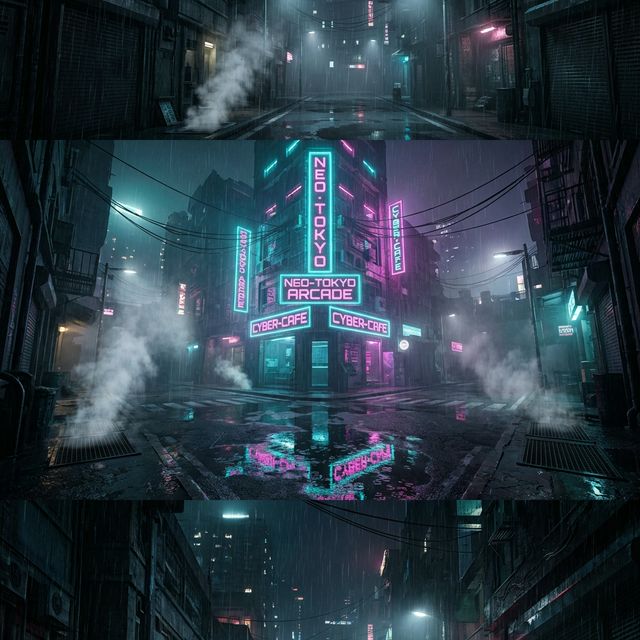
Rain-slicked streets reflecting pink and teal neon. A lone figure under a holographic billboard. Smoke rising between brutalist towers pierced by laser light. Cyberpunk is one of the most visually striking aesthetics in modern design — and as an animated live wallpaper, it becomes something else entirely.
This guide shows you exactly how to create cyberpunk animated live wallpapers for Android using the VisionAI app, with the specific prompts and image choices that make this aesthetic shine.
Why Cyberpunk Works So Well as a Live Wallpaper
The cyberpunk aesthetic has specific visual properties that make AI animation exceptionally effective:
- Rain and reflections — Falling rain, puddle reflections, and wet pavement are some of the most satisfying motion patterns to animate. The AI handles these naturally.
- Neon lighting — Neon signs flickering, LEDs pulsing, and holographic displays cycling are continuous, looping motion by nature.
- Atmospheric fog and smoke — Mist between buildings, steam from vents, smoke trails — all of these animate with a slow, hypnotic quality.
- Dark backgrounds — Cyberpunk scenes are predominantly dark, which means your app icons and widgets stay perfectly readable over the wallpaper.
The result is a wallpaper that feels alive without being distracting — the motion is atmospheric rather than attention-grabbing.
Choosing the Right Source Image
The most important factor for a great cyberpunk animated wallpaper is the source image. Here's what works:
Images that animate beautifully in cyberpunk style
- Night city aerial shots — Rain-slicked streets, neon reflections, traffic light trails from above
- Street-level urban scenes — Narrow alleyways with neon signage, storefront windows, wet concrete
- Sci-fi architecture — Brutalist towers with glowing window grids, elevated walkways, monorail bridges
- Character silhouettes — A lone figure facing a lit scene, with the environment as the main subject
- Abstract neon gradients — Pure neon color compositions (cyan/magenta/orange) animate like liquid light
Best sources for cyberpunk artwork
- AI-generated images — Tools like Midjourney produce photorealistic cyberpunk cityscapes. Use
--ar 9:16for portrait format. - Digital art and concept art — Fan art inspired by cyberpunk aesthetics, sci-fi concept illustrations
- Your own night photography — Real city night photos with neon signage animate beautifully with minimal prompting
File format: JPG or PNG. Minimum 1080px on the short side for clean output.
Step-by-Step: Creating Your Cyberpunk Wallpaper
Step 1: Download VisionAI
Install the VisionAI Android app from Google Play. Create an account to access the creation features.
Step 2: Open the creation screen
From the dashboard, tap "Create Live Wallpaper" and select Portrait (9:16) — this fills the full Android screen without cropping.
Step 3: Upload your image
Select your cyberpunk image from your gallery. VisionAI automatically crops and optimizes it for the 9:16 ratio.
Step 4: Write your motion prompt
This is where cyberpunk wallpapers really come alive. Here are the prompts that produce the best results for each sub-style:
Rain and neon city:
"Rain falling steadily, neon reflections rippling in puddles on the wet street, steam rising from sewer grates, holographic signs flickering slowly"
Night city aerial:
"Lights of the city pulsing slowly far below, hovercars drifting through fog, searchlight beams sweeping through the haze"
Atmospheric alley:
"Light rain, neon sign flickering, steam drifting from vents, distant crowd movement at the end of the alley"
Abstract neon:
"Neon light trails flowing slowly, color gradients shifting between cyan and magenta, particles drifting through the scene"
Sci-fi character / silhouette:
"City lights pulsing in the background, ambient light shifting, particles of light drifting past the figure"
Tip: Keep the prompt focused on the environment, not on moving the character. AI animation moves environmental elements more convincingly than it moves people.
Step 5: Choose duration
- 5 seconds (1 credit) — Ideal for rain, neon flicker, and subtle atmospheric motion. The loop is nearly invisible.
- 10 seconds (2 credits) — Better for slow fog rolls, city light sweeps, and anything that needs time to breathe.
The Loop workflow (2 credits) creates two joined 5-second clips for a completely seamless transition. Use it when the standard animation has a visible cut at the loop point.
Step 6: Generate and preview
Tap Generate. Generation takes 30–90 seconds. Preview the result — loop it several times and check that:
- Rain or particle motion feels natural
- Neon flicker (if any) doesn't feel jerky
- The loop point is not jarring
If not satisfied, regenerate. The second or third attempt is often noticeably better.
Step 7: Set as live wallpaper
Tap "Set as Live Wallpaper" and choose to apply it to Home screen, Lock screen, or both. Done.
Optional: Upscale to 4K
For flagship Android devices with high-density displays (Samsung Galaxy S series, Pixel Pro), use the Upscale to 4K workflow after generation (2 credits) for a sharper 2160p result.
The Best Cyberpunk Prompts — Quick Reference
| Scene | Prompt |
|---|---|
| Rainy neon street | "Rain falling, neon reflections in puddles, steam from vents, signs flickering" |
| Night aerial | "City lights pulsing, fog rolling between towers, searchlight sweeping" |
| Abstract neon | "Light trails flowing, color gradients shifting, particles drifting" |
| Dark alley | "Rain, distant neon glow, smoke rising, faint movement at far end" |
| Sci-fi interior | "Ambient light pulsing, holographic displays cycling, light refracting through panels" |
Tips for the Best Cyberpunk Results
Go darker than you think: Very dark cyberpunk scenes (near-black with point sources of neon light) animate with the most dramatic contrast. The AI isolates the bright elements and animates them against the dark background.
Avoid overly busy images: A street scene with dozens of equally bright neon signs can overwhelm the AI. A single main light source against dark atmosphere typically produces cleaner animation.
Rain works better than snow: The AI generates rain convincingly — parallel streaks falling at a slight angle. Snow tends to look like noise. If you want precipitation, use rain.
Regenerate freely: The AI has randomness in each generation. A scene that looks mediocre on the first attempt can look stunning on the third. Regenerate at least twice before giving up on a composition.
Test on the lock screen first: Cyberpunk wallpapers are often better as lock screens than home screens — notification content and time display look naturally integrated against a dark neon city backdrop.
Frequently Asked Questions
What's the best type of image for cyberpunk animated wallpaper? Environmental shots — cityscapes, alleyways, aerial views — produce the cleanest results. Close-up character faces should be avoided as AI animation can distort facial features.
How much does it cost? Credits are available in packs: 3 credits for $9.99, 10 credits for $19.99, 30 credits for $39.99, or 80 credits for $79.99. A 5-second animation costs 1 credit; a 10-second animation costs 2 credits.
My neon colors look washed out in the animation — why? This happens when the source image has very compressed dynamic range. Use an image where the neon lights are genuinely bright against a dark background, not a tone-mapped image where everything is similar brightness.
See also:
- Best Anime & Manga Live Wallpapers for Android in 2026
- How to Set a Live Wallpaper on Android with VisionAI
- Best AI Wallpaper Generators in 2026
Get VisionAI on Android
Create AI-animated live wallpapers directly from your phone — upload, generate, and set your wallpaper without leaving the app.