Some of the best live wallpapers are also the simplest. A dark gradient that breathes with slow color movement. A geometric pattern that pulses at the edges. A fluid ink form that drifts and reshapes. Abstract wallpapers work because they never compete with your app content — they exist behind everything, adding depth without demanding attention.
With AI animation, abstract images come alive in ways that feel genuinely hypnotic. This guide covers the best types of abstract imagery for live wallpapers and the prompts that make them move beautifully on Android.
Why Abstract Images Animate so Well
Abstract art is exceptionally well-suited to AI animation for a few reasons:
- No anatomical constraints — The AI doesn't have to worry about making a face or a hand move correctly. Abstract forms can morph freely without creating uncanny artifacts.
- Natural looping — Fluid, organic, or gradient-based motion has no inherent start or end — it loops seamlessly almost automatically.
- Works on every device — Abstract wallpapers look intentional and polished regardless of phone model or screen size.
- UI-neutral — A dark abstract gradient behind your icons never competes with notification badges, time displays, or widget text.
The Best Abstract Styles for Live Wallpapers
Dark Gradient Flow
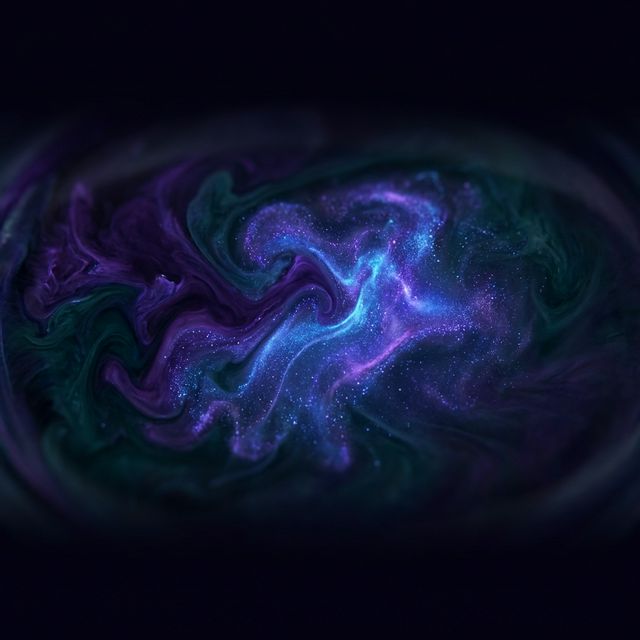
The most popular abstract wallpaper type: a deep, rich gradient (dark purple to midnight blue, deep teal to near-black, dark red to charcoal) that slowly shifts and breathes. The motion is subtle — barely perceptible until you stare at it — and the result is a wallpaper that feels alive without distracting.
Prompt: "Slow color gradients shifting and flowing, deep hues breathing softly, subtle luminance variation moving across the surface"
Fluid and Ink Art
Fluid paint pours, ink in water, marbling — these are already motion-like in their static form. The AI extends them into actual motion convincingly.
Prompt: "Fluid ink flowing and dissolving slowly, tendrils expanding and contracting, swirling motion with soft edges"
Geometric and Architectural
Sharp geometric patterns — hexagonal grids, concentric circles, tessellating triangles — animate with a pulsing, mechanical quality that feels precise and intentional.
Prompt: "Geometric pattern pulsing softly from the center outward, light refracting through the shapes, subtle rotation in the outer edges"
Particle Fields and Space
Star fields, particle clouds, and space-like environments produce deeply meditative animated wallpapers. The motion is slow, vast-feeling, and completely seamless.
Prompt: "Particles drifting slowly upward through the scene, soft glowing points moving at different speeds, deep space atmosphere"
Organic / Biomorphic
Cell-like structures, branching forms, and organic textures animate with a living quality — like looking at something microscopic and alive.
Prompt: "Organic forms breathing slowly, cell-like structures pulsing gently, soft growth at the edges of each shape"
Step-by-Step Guide
Step 1: Find or create your abstract image
Sources for abstract source images:
- AI-generated art — Midjourney, Adobe Firefly, or similar tools produce stunning abstract gradients and fluid compositions. Use
--ar 9:16for portrait format. - Digital art platforms — Large abstract and generative art sections. Always check licensing before animating someone else's work.
- Your own design work — If you design in Figma, Illustrator, or Procreate, export your abstract compositions as PNG for animation.
- Gradient generators — Online tools that produce textured gradient backgrounds. Export as PNG.
File format: JPG or PNG. Minimum 1080px on the short side.
Step 2: Open VisionAI
Install the VisionAI Android app from Google Play. Tap "Create Live Wallpaper" and select Portrait (9:16).
Step 3: Upload and prompt
Upload your abstract image. Use one of the prompts from this guide as a starting point — or combine elements:
"Slow color gradients flowing, particles drifting, subtle luminance breathing across the surface"
For truly minimal images (pure gradient, no texture), leaving the prompt empty and letting VisionAI's default apply often produces excellent results.
Step 4: Duration
- 5 seconds (1 credit) — Ideal for most abstract animation. Short loops that breathe are more effective than long loops that drag.
- 10 seconds (2 credits) — Better for particle fields and space animations where the motion needs space to feel vast.
The Loop workflow (2 credits) is especially effective for abstract wallpapers — the seamless joining makes the animation feel genuinely infinite.
Step 5: Generate, preview, set
Tap Generate. Preview it looping — abstract animations almost always look better after 3–4 loops when your eye has adjusted. Regenerate if needed. Tap "Set as Live Wallpaper" when satisfied.
Optional: Upscale to 4K
For the sharpest result on flagship Android devices, use the Upscale to 4K workflow after generation (2 credits). This makes a visible difference on high-density AMOLED displays where gradient banding is most noticeable.
Prompt Quick Reference
| Style | Prompt |
|---|---|
| Dark gradient | "Color gradients shifting and flowing slowly, deep hues breathing, subtle luminance movement" |
| Fluid ink | "Ink flowing and dissolving, tendrils expanding, swirling motion with soft edges" |
| Geometric | "Pattern pulsing from center outward, light refracting through shapes, subtle outer rotation" |
| Particle field | "Particles drifting slowly upward, soft glowing points at varying speeds, deep space atmosphere" |
| Organic | "Organic forms breathing, cell-like structures pulsing, soft growth at the edges" |
Tips for Abstract Wallpapers
Dark is almost always better: Abstract wallpapers with dark backgrounds keep your screen readable. Bright abstract wallpapers look great as art but are difficult to use with any app content on top.
Less prompt is more for abstract: Long, detailed prompts work well for nature and cyberpunk scenes. For abstract art, shorter prompts give the AI more freedom to respond to the image itself — often producing more interesting results.
Regenerate more for abstract: Nature images have expected motion patterns the AI recognizes. Abstract images are more open to interpretation. The variation between attempts is higher, which means you may need to try 3–4 times to find a result you love.
Upscale abstract images: Gradient banding (visible stepping between gradient colors) is the most common quality issue with abstract animated wallpapers on high-resolution screens. The Upscale to 4K workflow significantly reduces banding.
The Loop workflow matters most here: Abstract animation loops are most noticeable when the loop point has any visual discontinuity. The Loop workflow eliminates this completely for a truly seamless experience.
Frequently Asked Questions
Does abstract animation work without a text prompt? Yes — for abstract images, VisionAI's default prompt often performs well without any customization. If the default result feels too static, try one of the prompts from this guide.
How much does it cost? Credits are available in packs: 3 credits for $9.99, 10 credits for $19.99, 30 credits for $39.99, or 80 credits for $79.99. A 5-second animation costs 1 credit; 10 seconds costs 2 credits; upscaling to 4K costs 2 credits.
Can I animate a gradient I made in Figma? Yes. Export your Figma design as a PNG at 1080×1920 (9:16) and upload it directly to VisionAI. Gradient backgrounds are among the most reliable images to animate.
Why does my abstract animation look pixelated on my phone? This is typically gradient banding on a high-resolution AMOLED display. Use the Upscale to 4K workflow (2 credits) for a significantly cleaner result on flagship devices.
See also:
- Cyberpunk Animated Wallpapers for Android
- Best Anime & Manga Live Wallpapers for Android in 2026
- How to Set a Live Wallpaper on Android with VisionAI
Get VisionAI on Android
Create AI-animated live wallpapers directly from your phone — upload, generate, and set your wallpaper without leaving the app.