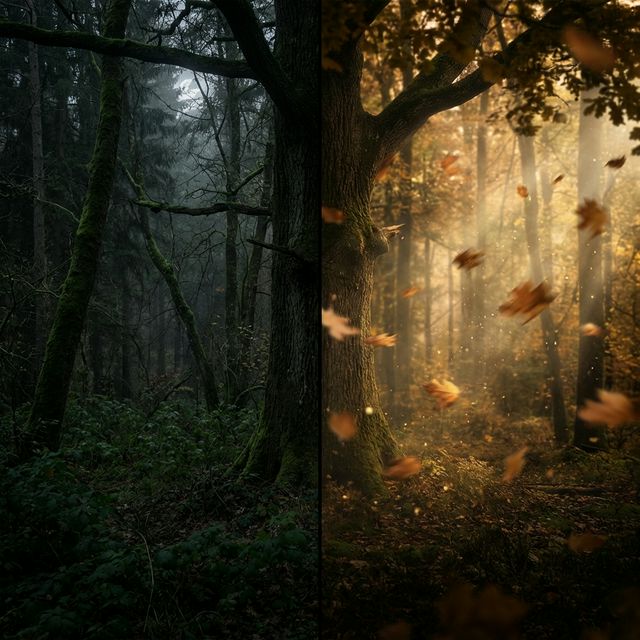
Static wallpapers are simple, fast, and universally supported. Live wallpapers look impressive but raise practical questions: does animated wallpaper drain the battery? Does it slow down the phone? Is it actually better, or is it a novelty?
This guide gives you honest answers to all of those questions so you can make the right choice for your device and usage pattern.
What Is a Live Wallpaper?
A live wallpaper (also called a dynamic or animated wallpaper) is a looping video or animation used as a background on your phone, tablet, or computer. Unlike a static image, it continuously plays — clouds moving, water flowing, particles drifting.
Modern live wallpapers are typically short MP4 video loops (5–10 seconds) that play on repeat. On Android, the operating system treats them as a special category with built-in power management. On desktop operating systems, third-party applications handle playback.
The Real Battery Impact
Battery drain is the most common concern about live wallpapers, and the answer depends on what device and what year you're asking.
On modern Android (2021 and later)
Modern Android devices use optimized GPU paths for live wallpaper playback. The actual battery impact of a looping 5–10 second MP4 is minimal on any mid-range or flagship device from 2021 onward.
Several factors determine the real-world impact:
- Loop duration: A 5-second loop renders more frames per hour than a 10-second loop, but both are negligible loads for modern GPUs.
- Content complexity: A simple gradient animation is lighter to render than a scene with many moving elements.
- Screen state: Android live wallpapers pause automatically when the screen is off. You only use power when actually looking at the screen.
- AMOLED displays: On AMOLED screens (common on Samsung, Pixel, OnePlus flagships), dark live wallpapers consume less power than bright ones because dark pixels are literally turned off. A dark animated wallpaper can be more battery-efficient than a bright static one.
Practical estimate: On a modern flagship, a live wallpaper adds roughly 1–3% more daily battery consumption compared to a static wallpaper under normal usage. This is imperceptible in real use.
On older or budget Android (pre-2019, entry-level)
On older devices or entry-level phones with slower GPUs, live wallpapers have a more noticeable impact — potentially 5–10% additional battery drain and occasional frame drops when scrolling. On these devices, a static wallpaper is the practical choice.
On desktop and laptop
On Windows and macOS, animated wallpapers use GPU resources continuously while the desktop is visible. Both Lively Wallpaper on Windows and macOS live wallpaper tools pause playback when the screen is covered by full-screen applications.
On a modern gaming GPU, the impact is negligible. On integrated graphics (typical in thin-and-light laptops), an animated wallpaper may reduce battery life by 10–20% when working at the desktop. Most animated wallpaper applications let you pause on battery automatically.
Performance and Smoothness
On modern Android, live wallpapers run in a separate rendering process from the UI. In practice, you will not notice any difference in scrolling speed or app launch time on a mid-range or flagship device.
On budget phones (under $150), performance impact is more variable. Test on your specific device — if the home screen feels less responsive with the live wallpaper enabled, switch back to static.
Visual Quality Comparison
This is where live wallpapers win unconditionally.
Static wallpapers, no matter how beautiful, are inert. Live wallpapers add:
- Depth — Motion creates a sense of three-dimensional space that static images can't convey
- Atmosphere — A landscape that breathes feels fundamentally different from a photograph of the same scene
- Personalization — A wallpaper animated from your own photo is something no one else has
- Mood — Motion sets a tone that static images only suggest
The visual difference is particularly striking on AMOLED displays where dark live wallpapers have deep blacks and vibrant color contrast.
Practical Considerations
Lock screen vs home screen
Live wallpapers work differently on these two surfaces:
- Lock screen: Less UI content overlaid, so the animation is more visible. This is where live wallpapers look best and where the visual impact is highest.
- Home screen: App icons, widgets, and dock elements sit on top. A subtle, dark animated wallpaper works well. A bright, busy animation makes the home screen harder to read.
The best approach: use your most visually striking live wallpaper on the lock screen, and a calmer or darker version on the home screen.
Notification readability
This is the most common practical complaint about live wallpapers: text on animated backgrounds can be harder to read. The solution is straightforward — choose dark animated wallpapers. A dark forest, a night sky, a dark gradient animation gives you the live wallpaper experience with full text readability.
App icon visibility
App icons with transparent areas can look odd over some animated wallpapers. Test your icon layout against the wallpaper before committing — a few minutes is enough to tell whether the combination works.
When to Use Static vs Live
| Situation | Recommendation |
|---|---|
| Flagship Android (2021+) | Live — negligible battery impact, excellent visual upgrade |
| Budget Android / older phone | Static — avoid unnecessary GPU load |
| iPhone lock screen | Live (Live Photo or video method) — visually excellent |
| iPhone home screen | Static — iOS home screen doesn't support animated wallpapers |
| Windows desktop (gaming PC) | Live — pauses in full-screen, no gaming impact |
| Thin-and-light laptop on battery | Static or pause-on-battery enabled |
| AMOLED display with dark wallpaper | Live — dark pixels save battery, cost lower than expected |
How to Get a Live Wallpaper
The easiest way to get a personalized animated live wallpaper on Android — from your own photo — is the VisionAI Android app. Upload an image, generate the animation, and set it as your wallpaper without leaving the app.
The AI generates a short looping video from your still image: landscapes breathe, water flows, light drifts. The full process takes under two minutes.
For desktop and iOS, see our dedicated guides:
The Verdict
If you have a modern Android phone and care about how your device looks, live wallpapers are worth it. The battery impact on recent hardware is minimal. The visual upgrade is real and consistent. And with AI animation tools, you're no longer limited to pre-made content — your own photos can be the wallpaper.
The only reason to stay with static: older hardware, aggressive battery optimization, or a preference for pure simplicity.
See also:
- How to Create AI Animated Wallpapers from Any Image
- How to Set a Live Wallpaper on Android with VisionAI
- Best AI Wallpaper Generators in 2026
Create Your First Live Wallpaper
Transform any image into a stunning animated live wallpaper in seconds — no design skills required.
Get started