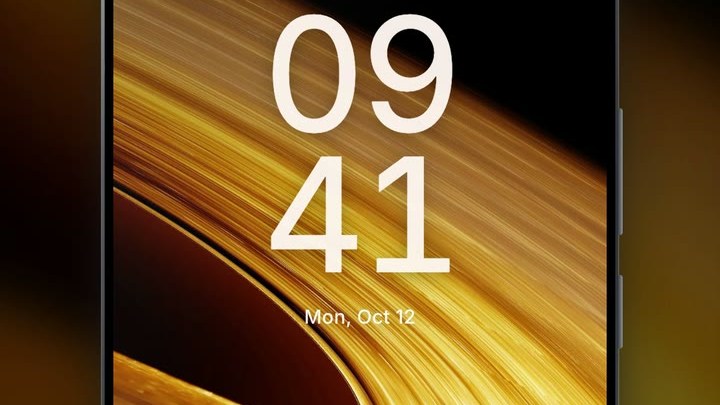
The space live wallpapers for Android on this page come from the new Space category of the VisionAI Marketplace. Saturn drifts just under the clock, Jupiter turns with its Great Red Spot, and a golden eclipse glows around a black disc. We recorded four of them on an Android lock screen, so you can watch them move before you install anything.
The Space category is in the VisionAI app: get VisionAI on Google Play.

The Space category
The Space category on the Marketplace collects animated scenes of planets, rings and the sky around them. Each one is a portrait video in HD, made for a phone screen.
Browsing the category is free, on the site and in the app. In the app, you unlock a wallpaper by watching a short video; on the web, you buy it once. Either way, you only get the ones you choose.
4 space live wallpapers, seen on a phone
Saturn
This is the wallpaper at the top of the page. The planet sits in the middle of the screen, just under the clock. The digits stay on plain black; only the date line touches the top of the rings. The motion is slow: Saturn drifts and turns a little. If you want a wallpaper that moves without pulling your eye every time you unlock the phone, start here.
Rings over a sea of clouds

This one has the warmest colors of the four. Golden rings sweep across the top of the screen while the streaks of light inside them keep flowing, above a layer of dark golden clouds. The clock sits right on the bright streaks, so the digits stand out less than on the black wallpapers. The lower half, over the clouds, is much calmer and darker.
Golden eclipse

The eclipse is the simplest of the four. A black disc covers the sun, and only the corona around it moves, a pale golden glow that shimmers around the edge. The disc sits right under the clock, and the date line rests on the top of the corona. Everything else stays dark, which keeps icons and notifications easy to read.
Jupiter

Jupiter fills the middle of the screen and turns, so the Great Red Spot moves across the disc while you look at it. It is the most detailed of the four: cream, white and orange bands, and the storm itself. The top of the planet sits behind the clock digits, so they are less sharp than on Saturn.
Why space works as a live wallpaper
Space scenes are mostly black, and white clock digits and icons stay readable on black, which a bright landscape can't promise. Not every space wallpaper keeps the clock on black: the rings and Jupiter put it over bright areas. The motion is slow too: a planet turning or a corona shimmering is something you notice when you look at the screen, and forget the rest of the time.
The black also helps on an OLED screen, where black pixels are switched off: a mostly black wallpaper lights up fewer pixels than a bright photo. For the full picture on battery use, read Do Live Wallpapers Drain Battery? Live vs Static Compared.
How to set a space live wallpaper on Android
- Install VisionAI from Google Play and sign in.
- Open the Marketplace and pick the Space category.
- Tap a wallpaper to watch its preview. The preview is a lighter SD copy; the wallpaper you get is in HD.
- Tap Get HD — watch a short video. When the video ends, Android's wallpaper screen opens by itself. With the one-time "no ads for life" purchase, the button reads Set as wallpaper (HD) and there is no video.
- Confirm there. Depending on your phone, you can choose the home screen, the lock screen, or both.
The step-by-step guide to the Android settings is in How to Set a Live Wallpaper on Android with VisionAI.
Make your own space wallpaper
If you have a photo of the night sky, the Moon or a planet, VisionAI can animate it with its AI engine:
| Setting | What you choose |
|---|---|
| Photo | Your image, in JPG or PNG |
| Format | Portrait 9:16 in the Android app |
| Prompt (optional) | The motion you want, for example "stars twinkle, the nebula drifts slowly" |
| Length | 5 seconds (10 credits) or 10 seconds (20 credits) |
| Loop | Tick Try a seamless loop to aim for an end close to the start |
Space photos suit this, because the motion you ask for is slow and steady. That kind of motion also gives the loop option its best chance, though the result still depends on the photo. The full walkthrough is in How to Create AI Animated Wallpapers from Any Image.
Frequently Asked Questions
Are these wallpapers HD? Yes. The Space wallpapers are portrait videos in HD. The preview you watch in the app is a lighter copy, and the wallpaper you set is the HD version.
Can I preview a space wallpaper before I get it? Yes. In the app, every wallpaper of the category plays its preview when you open it.
Will the wallpaper cover my clock? On Saturn, the digits sit on black. On the golden eclipse, the disc is right under the clock. On Jupiter and the rings over clouds, the clock is drawn over the planet or the bright streaks, so the digits are less sharp there. Watch the preview of each one before you pick.
Does a space live wallpaper drain the battery? A little more than a still image. On an OLED screen, a mostly black wallpaper lights fewer pixels. Do Live Wallpapers Drain Battery? Live vs Static Compared has the details.
To put Saturn or Jupiter behind your clock, install VisionAI from Google Play and open the Space category.
See also:
- How to Set a Live Wallpaper on Android with VisionAI
- Best Nature Live Wallpapers for Android in 2026
Get VisionAI on Android
Create AI-animated live wallpapers directly from your phone — upload, generate, and set your wallpaper without leaving the app.