The abstract wave live wallpapers for Android on this page come from the new Abstract category of the VisionAI Marketplace. There are no landscapes or characters in them, only lines and layers of color that ripple across the screen. We recorded four of them on an Android lock screen, so you can watch them move before you install anything.
The Abstract category is in the VisionAI app: get VisionAI on Google Play.

The new Abstract category
The Abstract category on the Marketplace is a new set of patterns made for a phone screen: contour lines, paper-like layers, metallic folds and fine strands of light. Each one is a portrait video in HD.
Browsing the category is free, on the site and in the app. In the app, you unlock a wallpaper by watching a short video, or with no video at all if you bought the "no ads for life" option. On the web, you buy a wallpaper once.
4 abstract wave live wallpapers, seen on a phone
Neon ripples
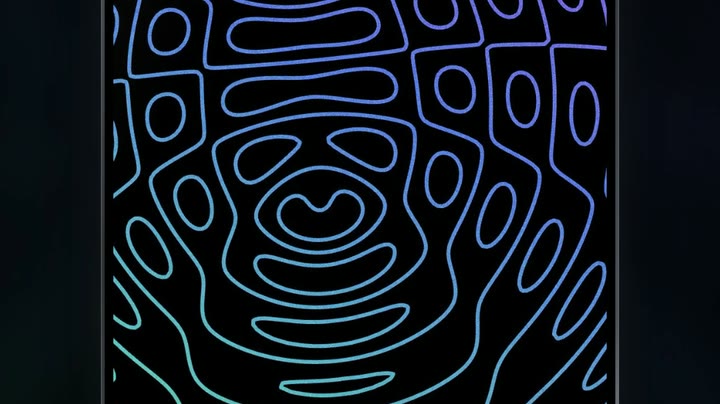
This is the wallpaper at the top of the page. Thin neon lines are drawn on pure black, like the contour lines of a map. They shade from purple at the top of the screen to blue in the middle and teal at the bottom. The rings gather around a point in the lower half, and as the ripple moves through them they bend and pinch into small loops.
The clock sits on the widest purple rings at the top. Since the lines are thin and most of the screen stays black, the "09" and "41" read clearly, and so does the date.
Layered flower

Here the waves are layers, cut like sheets of paper and stacked so that each one casts a soft shadow on the next. At the top they close into a flower whose dark purple heart sits right behind the clock. Lower down, the same layers stretch into wide bands of blue, teal and green.
The colors change as it plays. Over a few seconds the whole stack turns from purple and green to magenta, then to orange and yellow, then back through green to blue. Of the four, this is the brightest. The white clock stands out less when the center of the flower is at its palest, and comes back sharp when it turns purple or blue.
Golden waves

Folds of brushed gold run across the screen from the top left to the bottom right, with deep brown shadows in between. As it plays, the light slides along the folds, so one ridge turns pale and bright while the next one falls into shade.
The clock is drawn over the gold, near the top of the screen. The "09" and "41" stay readable, but where a fold catches the light behind them they lose some contrast. If you want a dark wallpaper behind your icons, pick the neon ripples or the flowing lines instead.
Flowing lines

Thousands of fine strands, purple and pink in some places and teal in others, flow up the screen like a current. They split around dark gaps and curl into eddies on the sides. The pattern keeps changing shape as it plays.
The clock floats over the strands near the top. The background between the lines is black, which keeps the clock and the date easy to read.
Why abstract waves work as a live wallpaper
An abstract wave has no subject to look at, so your eye doesn't stop on it. The motion is spread over the whole screen, which makes it easy to live with on a phone you unlock many times a day. Two of these four, the neon ripples and the flowing lines, also keep a black background, and on an OLED screen dark pixels use less power than bright ones. For the full picture on battery use, read Do Live Wallpapers Drain Battery? Live vs Static Compared.
How to set an abstract wave live wallpaper on Android
- Install VisionAI from Google Play and sign in.
- Open the Marketplace and pick the Abstract category.
- Tap a wallpaper to watch its preview. The preview is a lighter SD copy; the wallpaper you get is in HD.
- Tap Get HD — watch a short video. When the video ends, Android's wallpaper screen opens by itself. With the one-time "no ads for life" purchase, the button reads Set as wallpaper (HD) and there is no video.
- Confirm there. Depending on your phone, you can choose the home screen, the lock screen, or both.
The step-by-step guide to the Android settings is in How to Set a Live Wallpaper on Android with VisionAI.
Animate your own abstract wave
If you have an abstract image of your own, like a gradient, a painting or a photo of ink in water, VisionAI can animate it with its AI engine:
| Setting | What you choose |
|---|---|
| Photo | Your image, in JPG or PNG |
| Format | Portrait 9:16 in the Android app |
| Prompt (optional) | The motion you want, for example "the lines ripple outward from the center, colors shift along the waves" |
| Length and price | Nothing to choose: about 7–9 seconds, for 10 credits |
| Glowing lights (optional) | Tick it to let neon lines glow softly; leave it off to keep the light as it is |
| Loop | Nothing to tick: the animation aims to end close to where it starts |
Abstract images give the loop a good chance, because a wave has no natural start or end, though the result still depends on the image. Prompts for gradients, fluid ink and geometric patterns are in Abstract Animated Wallpapers for Android (2026 Guide).
Frequently Asked Questions
Are these wallpapers HD? Yes. The Abstract wallpapers are portrait videos in HD. The preview you watch in the app is a lighter copy, and the wallpaper you set is the HD version.
Can I preview a wallpaper before I get it? Yes. In the app, every wallpaper of the category plays its preview when you open it.
Which one keeps the clock easiest to read? The neon ripples and the flowing lines, which both draw thin lines on black. On the golden waves the clock loses some contrast where a fold catches the light, and on the layered flower it depends on the color of the moment.
What is the difference with the older abstract wallpapers? The Abstract category described here is a new set, separate from the older Abstract Art category of the Marketplace. Both are on the Marketplace, on the site and in the app.
To put neon ripples or golden waves behind your clock, install VisionAI from Google Play and open the Abstract category.
See also:
- Miniature World Live Wallpapers for Android: 4 Tiny Worlds
- Space Live Wallpapers for Android: 4 Picks in Motion
- Abstract Animated Wallpapers for Android (2026 Guide)
Get VisionAI on Android
Create AI-animated live wallpapers directly from your phone — upload, generate, and set your wallpaper without leaving the app.